

News
28
Oct
What Is a 55 Inch Touchscreen Vending Machine? How a Large-Screen Smart Vending Machine Works and Why the Screen Matters
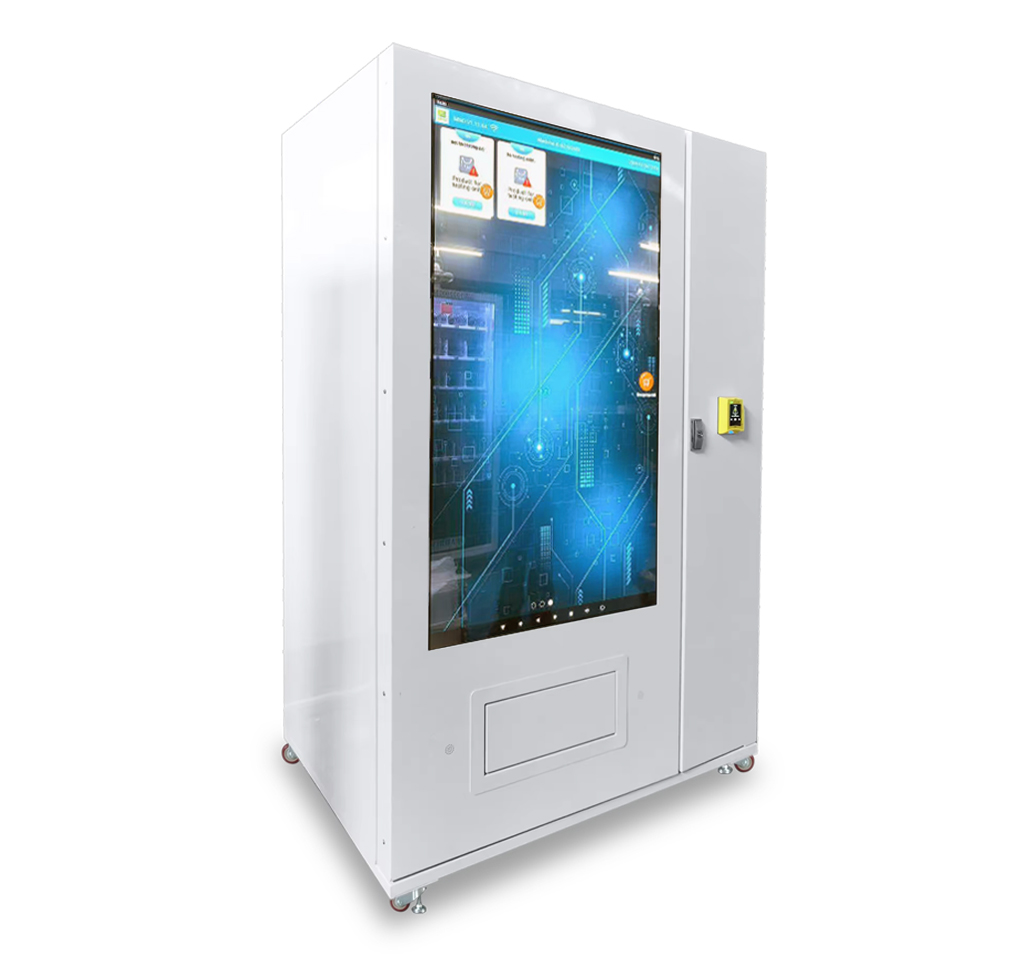
A 55 inch touchscreen vending machine is a smart snack and drink vending machine whose front is a large interactive display, used both as the selection interface and as an advertising and information screen. Instead of a small keypad, customers browse products on a screen about the size of a television, read product details, add several items to a cart and pay. When nobody is buying, the same screen plays the operator's pictures and videos. This guide explains what a large touchscreen vending machine is, how it works, what its software can do, how the large screen differs from a standard display, where it is used and what to check before choosing one.
Table of Contents
What is a 55 inch touchscreen vending machine?
How a large touchscreen vending machine works
Why screen size matters
Key specifications
Smart software explained
Using the screen for advertising
Remote management and data
Payment, protocols and connectivity
Cooling and goods trays
Where large touchscreen vending machines are used
Why choose MINNO
Frequently asked questions
References
1. What is a 55 inch touchscreen vending machine?
A large touchscreen vending machine, sometimes called an intelligent vending machine or digital vending machine, combines a conventional vending cabinet with an Android-based touch display. In the MINNO model, the display measures 55 inches and sits on a cabinet with a spiral goods tray of 6 floors × 9 slots. It supports multiple languages, and the owner can upload pictures, videos, a company logo, a service phone number and product details such as ingredients, place of origin and production date.
2. How a large touchscreen vending machine works
Attract. While idle, the screen plays advertisements and product promotions.
Browse. A customer touches the screen, views products and opens details.
Add to cart. Several products can be selected for one purchase.
Pay. The customer pays with bills, coins, a bank card, an e-wallet or an IC/ID card.
Dispense. The goods tray delivers each product to the pickup area.
Report. Sales and inventory records are updated and can be checked remotely.
3. Why screen size matters
A 55 inch display is not just a bigger version of a small screen. It changes how the machine sells:
| Factor | Small screen or keypad | 55 inch touchscreen |
|---|---|---|
| Visibility | Customers must come close | Attracts attention from a distance |
| Product information | Limited labels | Multiple detail pictures, ingredients, origin, dates |
| Advertising | Minimal | Large picture and video ads |
| Browsing | One code at a time | Visual, menu-style browsing |
| Brand impact | Low | Machine becomes a branded display |
Because the screen is the first thing a customer sees, it works as a small digital signboard as well as a payment terminal.
4. Key specifications
The specifications listed on the MINNO product page:
| Item | Specification |
|---|---|
| Touch screen | 55 inches |
| Size | 1160 mm (W) × 830 mm (D) × 1940 mm (H) |
| Material | Metal plate |
| Weight | 400 kg |
| Operating system | Android 11 |
| Rated power supply | AC100V–240V, 50Hz/60Hz |
| Rated power consumption | 450 W |
| Capacity | 6 floors × 9 slots |
| Goods tray types | Spiral, direct push, conveyor belt, hanging slot |
| Cooling system | 3°C to 20°C (adjustable), brand compressor, R290 refrigerant |
| Internet | WiFi, 3G/4G SIM card, LAN |
| Protocol | RS232 / MDB |
| Function | SDK (Software Development Kit) |
| Warranty | 18 months hardware warranty, software updating |
| Certification | CE certified |
| Service | Video technical support, free spare parts, online support |
Please confirm final configuration and dimensions with the sales team when planning installation.
5. Smart software explained
For customers
Check multiple detail pictures for each product on the touchscreen.
Use the shopping cart to buy several items at once, so they can buy more items faster.
Benefit from discounts for multiple purchases, which encourage customers to buy more.
For operators
Upload your company logo and service number, so customers can contact you immediately if they have a problem while shopping.
Upload pictures and video advertisements remotely.
Show ingredients, place of origin, production date and other product details.
Choose from multiple available languages.
6. Using the screen for advertising
With a large display, the vending machine becomes a small media point. Practical ways to use it include:
Promoting best-sellers and new products
Announcing discounts for multiple purchases
Showing your logo and support number
Displaying product information to build customer trust
Updating content remotely, for example for seasonal promotions
Check local rules for any advertising you display, and make sure you have the rights to any images or videos you upload.
7. Remote management and data
Operators can manage the machine from a PC or mobile phone:
Turn the screen and lighting on or off remotely. For example, in the evening you can turn off the lighting and screen to save energy.
Check real-time inventory for timely replenishment.
Review daily and weekly sales to promptly remove products with poor sales.
For operators with several machines, remote data reduces unnecessary trips and helps keep products in stock.
8. Payment, protocols and connectivity
Listed payment options include bills, coins, bank cards (credit cards), e-wallets, IC/ID cards and card readers from Nayax, ITL, ICT, Ingenico, Mei, PAX and OTI. The standard protocols are RS232 and MDB.
MDB (Multi-Drop Bus) is a vending industry protocol that lets the machine controller communicate with payment devices such as coin acceptors, bill validators and cashless readers.
RS232 is a long-established serial communication standard used to connect devices.
Connectivity options are WiFi, 3G/4G SIM card and LAN. Tell your supplier which payment provider you plan to use in your market so the right reader can be confirmed.
9. Cooling and goods trays
The machine has an adjustable 3°C to 20°C refrigeration system. There are four goods tray options (spiral, direct pusher, hanging slot and conveyor belt) so that many types of products can be sold. Spiral trays suit snacks and drinks, while other options suit boxes, hanging packages and special products. See our guide to vending machine goods trays.
10. Where large touchscreen vending machines are used
Corporate offices and workplaces: immediate access to snacks and beverages that can replace or supplement canteens.
Educational institutions: quick refreshments for students and staff between classes.
Healthcare facilities: 24-hour access to food and drinks for visitors, patients and staff.
Transportation hubs: grab-and-go options in airports, metro stations and bus terminals.
Gyms and fitness centers: protein bars, energy drinks and water.
Retail and hospitality: malls, shopping centers and hotels.
Industrial areas and warehouses: on-site food options for workers.
For location tips, read Snack and Drink Vending Machine Guide: Best Locations, Price Range and What to Check.
11. Why choose MINNO
MINNO is a professional manufacturer of vending machines, smart lockers and furniture, supporting customization. The 55 inch touchscreen vending machine offers a large display, four goods tray options, smart software, SDK, CE certification, an 18-month hardware warranty and software updates. See the 55 Inch Touchscreen Vending Machine, compare it with the 22 Inch Touch Screen Vending Machine, and browse our snack and drink vending machines.
12. Frequently asked questions
What is a 55 inch touchscreen vending machine?
A smart vending machine with a 55 inch interactive display used for browsing, payment, advertising and product information.
Can I show my own advertisements?
Yes. You can upload pictures, videos, your logo, a service number and product details, and the screen shows your advertisements when nobody is buying.
Can customers buy several items at once?
Yes. The shopping cart supports multiple purchases, and you can offer discounts for multiple purchases.
Can I manage the machine remotely?
Yes. From a PC or mobile phone you can turn the screen and lighting on or off, check real-time inventory and view daily and weekly sales.
What operating system does it use?
Android 11.
What is the warranty?
18 months hardware warranty and software updating, with video technical support, free spare parts and online support.
Is it CE certified?
Yes. Please confirm any additional certifications needed for your market.
Request a quotation
Email: sales@buysmartlocker.comWhatsApp / Phone: +86 132 1355 7186Business hours: Monday to Saturday, 8:00 to 18:30
13. References
MINNO. 55 Inch Touchscreen Vending Machine (product page). Specifications, features, applications and listed prices. https://www.buysmartlocker.com/snack-and-drink-vending-machine/55-Inch-Touchscreen-Vending-Machine.html
Wikipedia. Multi-Drop Bus / Internal Communication Protocol. https://en.wikipedia.org/wiki/Multi-Drop_Bus_/_Internal_Communication_Protocol
Vending Times. NAMA Publishes Updated Multi-Drop Bus Standard Version 4.3. https://www.vendingtimes.com/blogs/nama-publishes-updated-multi-drop-bus-standard-version-43/
Wikipedia. RS-232. https://en.wikipedia.org/wiki/RS-232
Specifications, prices and configurations are taken from MINNO's website and may change. Please confirm the latest details with the MINNO sales team before ordering. Explanations of general technology terms reflect common industry knowledge. Information reviewed: October 2026.
Our Contact
Minno Furtniture
Customize smart storage lockers,parcel delivery lockers, key management cabinet,Vending machines,Office/School and home furniture.
-
Call For Inquiry
-
Send Us Email
sales@buysmartlocker.com
Need Help For Project!
We are ready to help your next projects, let’s work together
 WhatsApp
 sales@buysmartlocker.com
 +8613213557186