

News
16
Oct
Manual vs Electric vs Smart Mobile Shelving: How to Choose the Right Control Method
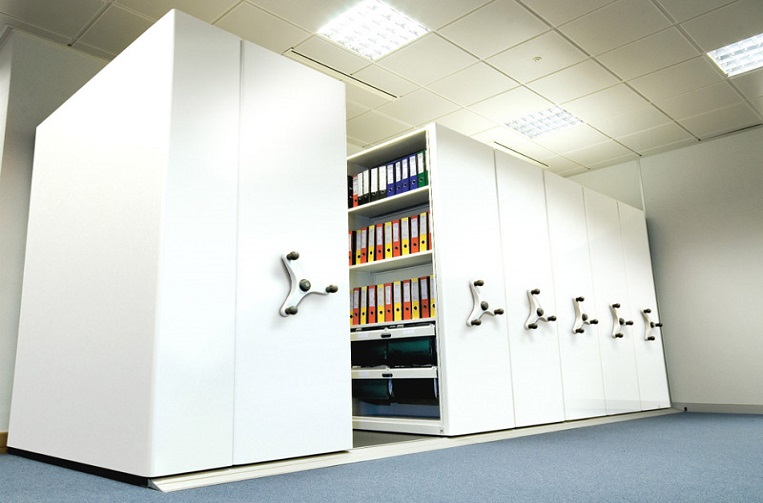
The three control methods for mobile shelving are manual (handwheel), electric (motor-assisted) and smart (electric plus touchscreen, RFID or remote-controlled access). All three use the same high-density principle, in which shelving units move on rails to open a single aisle. The difference lies in how the units are moved, how much effort is needed, and how well access can be controlled and recorded. This guide explains how manual mobile shelving, electric mobile shelving and smart mobile shelving work, compares their advantages and limits, and helps you choose the right one for your archive, library, hospital or office.
Table of Contents
Quick comparison
Manual mobile shelving
Electric mobile shelving
Smart mobile shelving
Safety across all three
Side-by-side comparison
Which one should you choose?
Upgrading later
Frequently asked questions
1. Quick comparison
| Manual | Electric | Smart | |
|---|---|---|---|
| How units move | Handwheel | Electronic-assisted motor | Motor with intelligent control |
| Operator effort | Moderate | Low | Low |
| Access control | Lock | Lock | Touchscreen, RFID authorization, remote control |
| Relative cost | Lowest | Medium | Highest |
| Best for | Small to medium archives | Heavy loads, frequent use | Secure, managed or high-value archives |
MINNO mobile shelving is available with all three adjustment methods: manual, electric and smart.
2. Manual mobile shelving
How it works. The operator turns an ergonomic handwheel, which drives the carriage along the rail through a mechanical transmission. Units move one section at a time to open the aisle.
Advantages
Lowest purchase cost among the three
No electricity needed to move the units
Simple mechanism and straightforward maintenance
Reliable even where power is unstable
Limitations
Requires physical effort, especially with heavy loads
Slower when many units must be moved
Less suitable for very long runs or heavy collections
Best for: small and medium archives, school and office storage rooms, and installations where budget is the main concern.
3. Electric mobile shelving
How it works. An electronic-assisted mechanism drives the carriages. The user presses a button, and the selected units move automatically to open the aisle. Safety sensors help prevent accidents during movement.
Advantages
Little physical effort, even with heavy loads
Faster opening of aisles on long runs
More comfortable for frequent users
Suitable for large, heavily loaded systems
Limitations
Higher cost than manual systems
Needs a power supply and a basic electrical installation
Requires periodic electrical maintenance
Best for: busy archives, libraries and records rooms with heavy collections, or where staff of varying physical strength use the system.
4. Smart mobile shelving
How it works. A smart mobile shelving system builds on the electric system and adds intelligent access management. MINNO offers optional smart access integration, including:
Electronic touchscreen control: select the aisle you want to open on a screen.
RFID authorization: only authorized cards or credentials can open a section.
Remote-controlled aisle opening: open an aisle from a distance for faster access.
Advantages
Controlled access to sensitive records, with only authorized users able to open sections
Convenient aisle selection from a touchscreen
Better management efficiency
Combines the physical-effort savings of electric systems with security and control
Limitations
Highest cost
Needs more planning for software, credentials and user management
Best for: government and corporate archives, hospital medical record rooms, law firms, museums and any place where confidentiality and traceable access matter.
5. Safety across all three
Regardless of the control method, a good system includes:
Anti-tilt protection to keep units stable
Safety sensors on powered systems to help prevent accidents while units are moving
Locking function to hold units in place while people work in an aisle, and to secure the whole system when closed
Ergonomic design of handwheels and controls
Always follow the manufacturer's operating and safety instructions, and train all users before the system goes into service.
6. Side-by-side comparison
| Factor | Manual | Electric | Smart |
|---|---|---|---|
| Purchase cost | Low | Medium | High |
| Electricity required | No | Yes | Yes |
| Effort to move heavy loads | Higher | Low | Low |
| Speed of aisle opening | Slower | Faster | Fast, with direct selection |
| Access control | Lock | Lock | RFID, touchscreen, remote |
| Suited to long runs | Limited | Yes | Yes |
| Maintenance | Mechanical | Mechanical + electrical | Mechanical + electrical + software |
| Typical users | Small archives, schools | Busy archives, libraries | Secure or managed archives |
7. Which one should you choose?
Answer these questions:
How heavy and how long will the shelving runs be? Heavy and long runs favor electric or smart.
How often will staff access the records? Frequent access favors electric or smart.
How confidential are the records? High confidentiality favors smart access control.
Who will operate the system? If users vary in physical strength, choose powered operation.
What is your budget? Manual costs least; smart costs most.
Is the power supply reliable? If not, manual may be the safer choice.
Do you need a record of who accessed what? If so, smart integration helps.
A simple rule of thumb: choose manual for small collections and tight budgets, electric for heavier, busier systems, and smart where access control and management efficiency are priorities.
8. Upgrading later
If you are unsure, ask your supplier whether a manual system can be upgraded later with electric or smart features. Planning for this at the design stage can avoid rebuilding the whole system when needs change.
9. Frequently asked questions
What is the difference between manual and electric mobile shelving?
Manual systems are moved by turning a handwheel. Electric systems use an electronic-assisted mechanism, so the user simply presses a button.
What makes a mobile shelving system "smart"?
Smart systems add intelligent features such as an electronic touchscreen, RFID authorization and remote-controlled aisle opening, which improve security and management efficiency.
Is electric mobile shelving safe?
Quality electric systems include safety sensors and anti-tilt protection to help prevent accidents. Always follow the manufacturer's instructions.
Which type is best for a hospital medical record room?
Medical records are confidential, so electric or smart systems with controlled access are often preferred. Your needs and budget will decide the final choice.
Can I mix control types in one project?
Ask your supplier. Many projects configure different areas to suit their usage.
Request a quotation
See the MINNO Mobile Shelving System with manual, electric and smart options, or learn the basics in our guide to what is a mobile shelving system.
Email: sales@buysmartlocker.comWhatsApp / Phone: +86 132 1355 7186
Our Contact
Minno Furtniture
Customize smart storage lockers,parcel delivery lockers, key management cabinet,Vending machines,Office/School and home furniture.
-
Call For Inquiry
-
Send Us Email
sales@buysmartlocker.com
Need Help For Project!
We are ready to help your next projects, let’s work together
 WhatsApp
 sales@buysmartlocker.com
 +8613213557186